


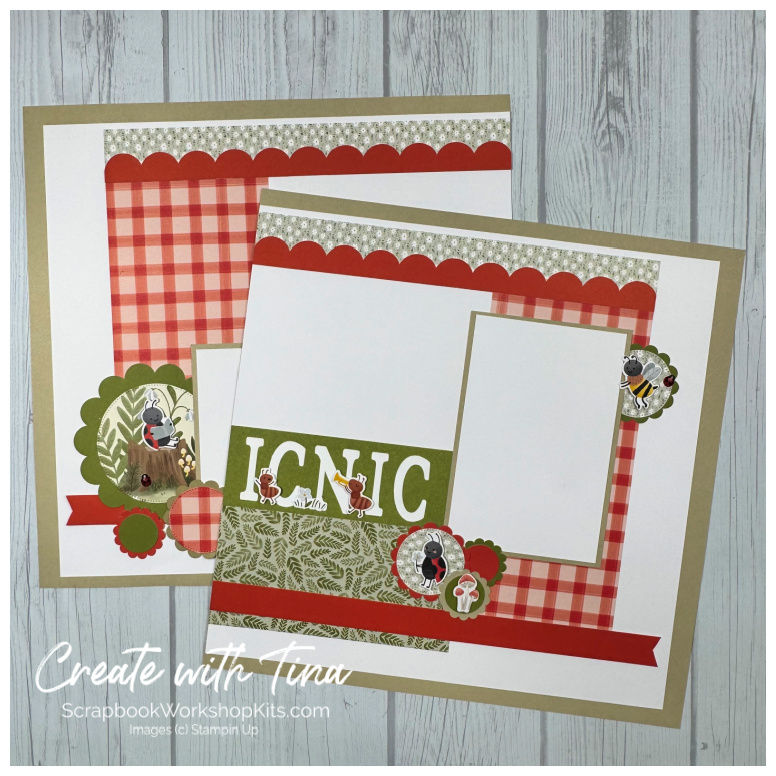


Cute As A Bug 12x12 Scrapbook Tutorial PDF – 8 Layout Guide
$20.00
🐞 Cute As A Bug Scrapbook Tutorial – 8 Layout PDF Guide
Create playful, nature-inspired scrapbook pages — without starting from scratch.
The Cute As A Bug Scrapbook Tutorial is a step-by-step PDF guide that walks you through creating eight coordinated 12" x 12" scrapbook layouts using Stampin’ Up products and a warm, earthy color palette.
Designed for scrapbookers who love cohesive albums but don’t want to spend hours designing from zero, this digital tutorial gives you the structure while still leaving room for your creative style.
Perfect for documenting:
Outdoor adventures
Camping trips
Playtime
Kids and grandkids
Everyday family memories
With clear cutting guides, full-color layout photos, and simple assembly instructions, you’ll move confidently from paper prep to finished pages.
✨ What You’ll Learn
How to cut and prepare your papers efficiently
How to assemble each 12x12 layout step-by-step
Tips for layering and balancing earthy green and rustic red tones
How to create a cohesive scrapbook album using coordinated designs
Ways to personalize the layouts for your own photos
📌 What’s Included
Step-by-step cutting guide for all 8 layouts
Step-by-step assembly instructions
Full-color photos of every completed page
Photo placement suggestions
Organized workflow so you can complete layouts efficiently
Instant digital PDF download (view, save, or print)
❤️ Perfect For
Scrapbookers who love Stampin’ Up products
Memory keepers who want coordinated 12x12 layouts
Beginners who want guidance
Experienced scrapbookers who want a done-for-you design plan
Anyone who prefers tutorials over guessing measurements
🌿 Scrapbook With Confidence
This Cute As A Bug PDF tutorial guide is designed to remove the overwhelm and help you focus on what matters — telling your story.
With structured instructions and full-color visual references, you’ll create nature-inspired scrapbook pages that feel cohesive, playful, and beautifully finished.
Just print the guide (or keep it open on your tablet), gather your supplies, and start creating.
📥 A Quick Note Before You Purchase
After purchase and account setup, your tutorial will be available immediately. You can view it, download it, or print it from your computer or device.
• This is a digital product — no physical items will be mailed
• Designed for personal use only (you may create projects for yourself or classes you teach)
• Please do not share, resell, or distribute the tutorial
• Due to the nature of digital products, all sales are final
Frequently Asked Questions
❓ Is this a physical scrapbook kit?
No. This is a digital PDF tutorial only. No physical products or supplies are included.
❓ What will I receive after purchase?
You’ll receive a downloadable PDF tutorial that includes:
• Step-by-step cutting guide
• Step-by-step assembly instructions
• Full-color photos of all 8 completed layouts
• Photo placement suggestions
Your tutorial is available immediately after purchase.
❓ What supplies do I need?
You will need the coordinating scrapbook products, photos, adhesive, and basic paper crafting tools. The tutorial shows you exactly how to cut and assemble the layouts using your supplies.
❓ Is this tutorial beginner friendly?
Yes! The tutorial includes clear step-by-step instructions and full-color photos, making it great for beginner through experienced scrapbookers.
❓ Can I print the tutorial?
Yes! You can view it digitally, download it, or print it for personal use.
❓ Can I teach classes using this tutorial?
Yes — you may use the tutorial to create projects for personal use or classes you teach.
However, the tutorial itself may not be shared, copied, resold, or distributed in any format.
❓ Do you offer refunds?
Due to the nature of digital products, all sales are final.
❓ When will I get access to my tutorial?
Your tutorial is available for download immediately after purchase and account setup.
❓ What if I don’t have the exact papers or embellishments?
You can absolutely substitute similar scrapbook papers or embellishments. The tutorial focuses on layout design and assembly, which works with many product variations.
Quantity